Unlimited History
Every copy, forever. Search through thousands of items instantly with fuzzy search. Filter by content type, date, sensitivity level, or custom tag.
No item limit, ever
Stop losing important snippets. ClipboardBuddy captures everything you copy, organizes it by project, automatically protects sensitive data, and lets you paste at lightning speed.
Powerful features designed for developers, designers, and power users who demand more from their clipboard.
Every copy, forever. Search through thousands of items instantly with fuzzy search. Filter by content type, date, sensitivity level, or custom tag.
Create isolated workspaces for each project or client. Switch context instantly with a hotkey. Your design snippets never contaminate your code snippets.
ClipboardBuddy automatically detects passwords, API keys, credit cards, and private keys — encrypting them the moment they're copied. No leaks, no worries.
Build reusable templates with {{variables}}, assign items to 9 instant-paste hotkeys (Ctrl+Shift+1-9), and fill entire forms in a single keystroke.
Browse your clipboard history as a visual timeline with a calendar picker. Jump to any date and rediscover content you copied weeks ago. Activity heatmap included.
Record automated paste sequences for login flows, form fills, and code scaffolding. Assign macros to hotkeys and permanently eliminate repetitive workflows.
ClipboardBuddy encrypts sensitive content the moment it's detected — automatically, with no configuration required. Your data never leaves your machine.
ClipboardBuddy lives in your system tray. No configuration. Just install and go.
Download and install ClipboardBuddy. It runs silently in your system tray from that point on. Press Ctrl+Shift+V anytime to summon it.
Keep working as normal. ClipboardBuddy captures every copy automatically. Create Spaces for projects, pin important items, and add custom tags.
Search history and paste with a click. Use Ctrl+Shift+1-9 for quick-paste slots. Run macros to automate entire paste workflows in one keypress.
No mockups. This is the actual app running on Windows.
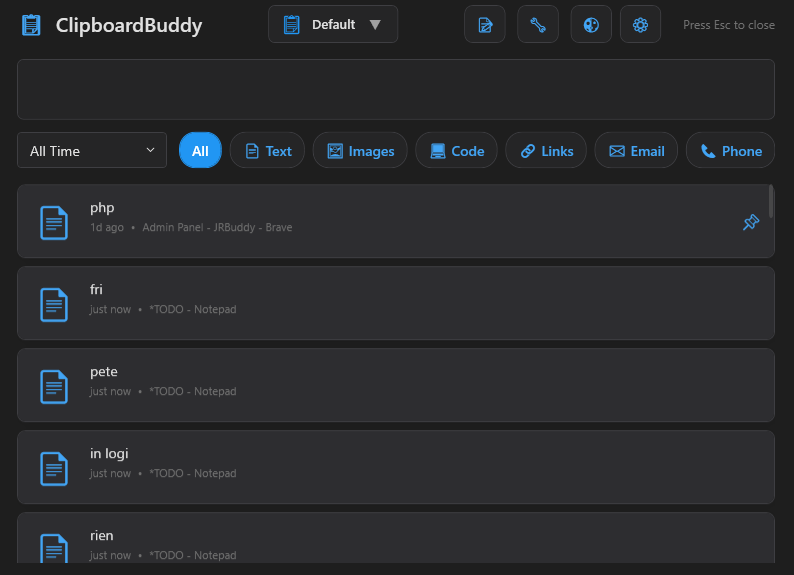
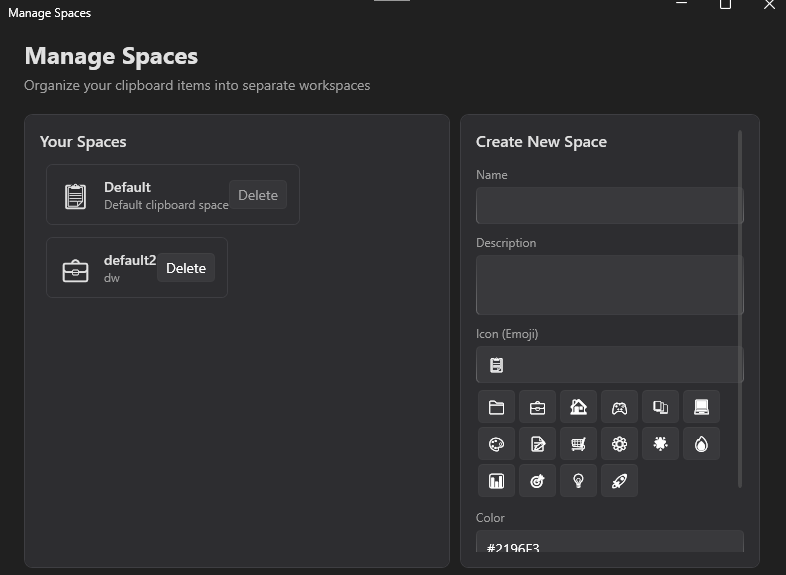
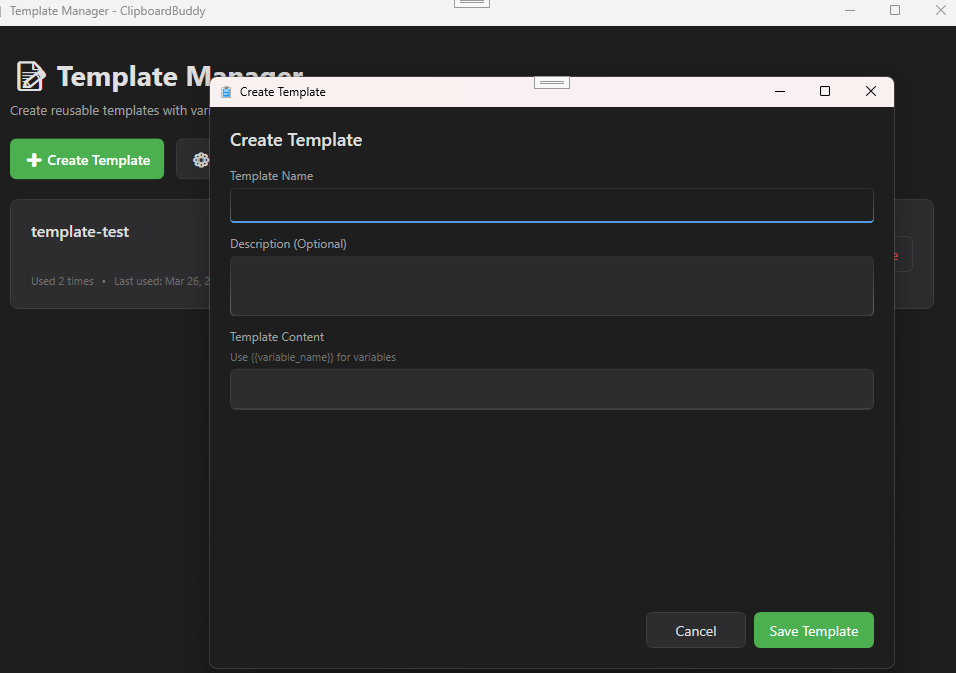
{{variable}} placeholders. Fill them in with a dialog and paste instantly.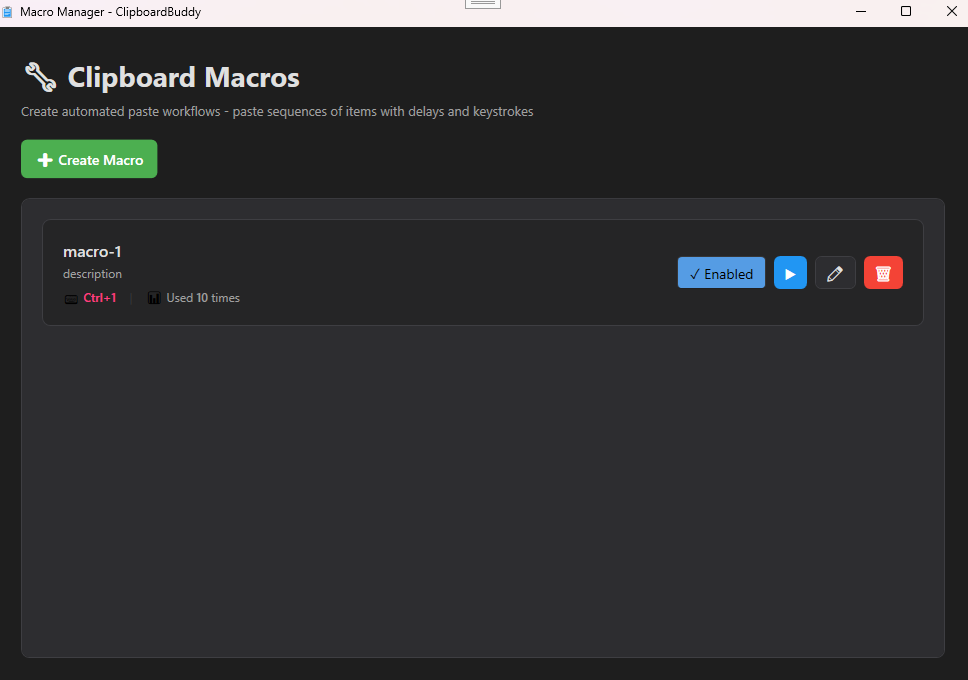
No subscriptions. No tricks. Pay once, use forever.
Everything you need to get started
Every feature, billed monthly. Cancel anytime.
Cancel anytime · Instant activation · One machine
★★★★★"ClipboardBuddy completely changed how I write content. I keep all my headline drafts, ad copy variations, and brand voice notes in separate Spaces. Switching between campaigns takes one click instead of digging through Notion pages."
★★★★★"As a designer I'm constantly switching between clients. Having separate spaces for each client's color codes, fonts, and copy is something I didn't know I needed. The image clipboard history alone is worth the price."
★★★★★"I set up macros for my most repetitive deployment tasks — pasting server configs, SSH commands, environment variables in sequence. What used to take two minutes of copy-pasting is now a single hotkey. I've automated at least an hour of my day."
Yes. Core features — unlimited clipboard history, search, filtering, folder organization, and tagging — are completely free with no time limit. The Pro tier unlocks advanced features like Spaces, security encryption, templates, and macro automation for $10/month. Cancel anytime.
Absolutely not. All clipboard data is stored locally on your computer. No internet connection is required for core features, and nothing is ever uploaded to any server. ClipboardBuddy is 100% offline and private.
ClipboardBuddy automatically encrypts sensitive items like passwords and API keys the moment they're copied. The encryption is tied to your account, so even if someone got hold of your data file, they couldn't read a thing.
ClipboardBuddy supports Windows 10 and Windows 11. It requires the .NET 8 Desktop Runtime, which the installer will automatically download if not already present on your system.
The standard Pro license is valid for one machine. License keys are hardware-bound for security reasons. If you need multi-device access, contact our support team for a multi-device arrangement.
No. ClipboardBuddy uses an event-driven architecture and only processes events when you actually copy something. It has a minimal memory footprint and runs quietly in the system tray with no measurable impact on system performance.
Join thousands of developers, designers, and power users who have supercharged their workflows. Free to download, no account required.
Windows 10/11 · No account · No subscription · Privacy first